ArUco Markers: The Fastest Path to Tracking
Visually track objects in no time
Computer vision has a way of making easy problems look hard. “Where is the robot?” sounds like a deep question. SLAM, feature matching, neural nets, the whole stack. Most of the time you don’t need any of it. You just need a sticker.
ArUco markers are black-and-white squares with a unique ID baked into the pattern. Stick one on the thing, point a camera at it, and OpenCV gives you back the four corners in one function call. From the corners you get position. From the corner ordering you get orientation. If you’ve calibrated the camera, you get full 3D pose. The whole library is ten years old and still the right answer for ninety percent of “where is X” problems.
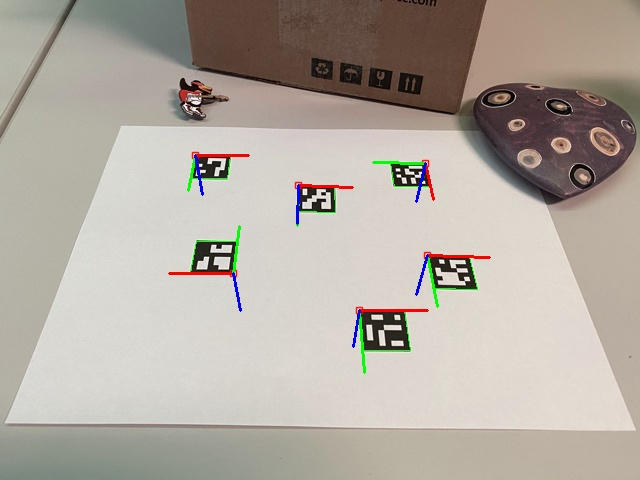
A working detector is about ten lines.
import cv2
import numpy as np

aruco_dict = cv2.aruco.getPredefinedDictionary(cv2.aruco.DICT_4X4_50)
detector   = cv2.aruco.ArucoDetector(aruco_dict, cv2.aruco.DetectorParameters())
cap        = cv2.VideoCapture(0)

while True:
    ret, frame = cap.read()
    gray = cv2.cvtColor(frame, cv2.COLOR_BGR2GRAY)
    corners, ids, _ = detector.detectMarkers(gray)

    if ids is not None:
        cv2.aruco.drawDetectedMarkers(frame, corners, ids)
        for i, marker_id in enumerate(ids.flatten()):
            cx = int(corners[i][0][:, 0].mean())
            cy = int(corners[i][0][:, 1].mean())
            print(f"ID {marker_id} at pixel ({cx}, {cy})")

    cv2.imshow("frame", frame)
    if cv2.waitKey(1) == ord("q"):
        break
Three things will bite you on the way in.
First, the package. opencv-python doesn’t have ArUco. You need opencv-contrib-python. This is the single most common reason for “AttributeError: module cv2.aruco has no attribute X” on Stack Overflow, and the fix is a one-line reinstall.
Second, the dictionary. DICT_4X4_50 means 4×4 grid, 50 markers. Bigger dictionaries (DICT_6X6_1000) give you more unique IDs but the detector gets pickier and slower. Pick the smallest one that fits your scene. Four markers on a robot? DICT_4X4_50 and move on.
Third, and this is the one that costs you an hour the first time, corner ordering. OpenCV returns corners as top-left, top-right, bottom-right, bottom-left. In image coordinates. Where y points down. Which means if you compute a heading and feed it to anything that assumes math-standard axes, your robot drives in mirror-world.
def marker_heading(corners_single):
    # corners_single is shape (4, 2)
    top_mid = (corners_single[0] + corners_single[1]) / 2
    center  = corners_single.mean(axis=0)
    dx, dy  = top_mid - center
    return np.arctan2(-dy, dx)  # image y is flipped
The negative dy is small and stupid and you only need to get burned by it once.
Pixels are fine for debugging but useless downstream. Once you’re past the proof-of-concept, you want world coordinates — meters, not pixels. The trick is to place four markers at known physical positions in your scene, detect them, and hand the four (pixel, world) pairs to cv2.findHomography. From then on a single matrix multiply takes any pixel to its location on the floor. Combine it with cv2.undistort to kill lens warp first and the rest of your code never has to know a camera was involved.
That’s the punchline, really: a good tracker is the only thing in your system that touches pixels. Detect, undistort, homography, done. Everything downstream (pathfinding, control, logging) gets meters. The pixels stay in the box.
Print markers with cv2.aruco.generateImageMarker. Tape them down. You’re tracking.