Tair Keyboard V1
A custom wireless split keyboard.
view project →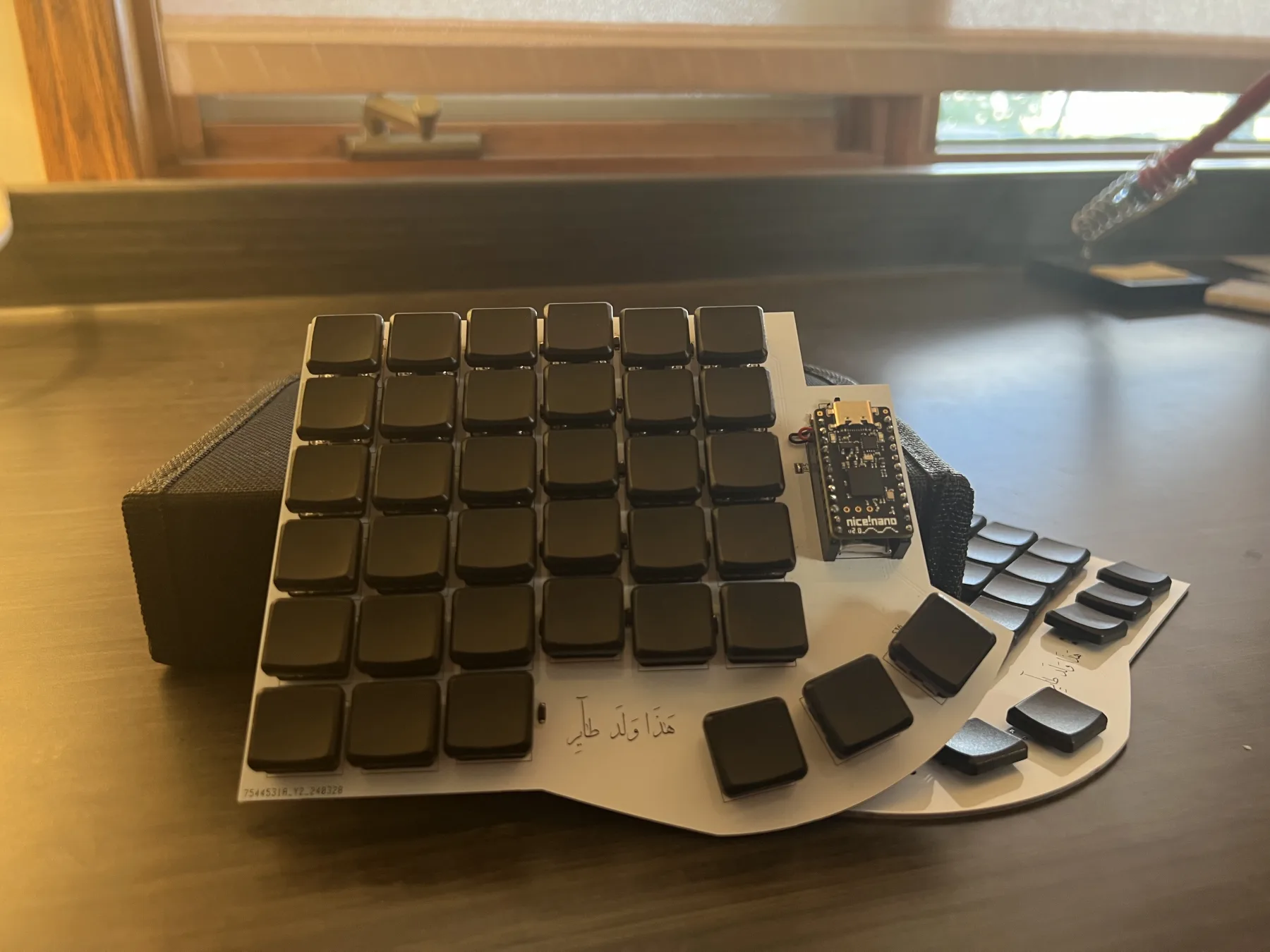
Most keyboards ask you to accept the usual compromise: buy the polished thing, adapt to its decisions, and stop asking questions once it works. I wanted something that worked for me. Tair Keyboard V1 started as an attempt to build a split board I could inspect, modify, and rebuild without treating it like a sealed appliance. There are plenty of good split keyboards, including the Voyager by ZSA, but I wanted something that was wireless and built for my hand. It would cost more to iterate this way, but it also meant far more freedom to tune the board to my typing habits and hand size.
V1 is my first pass at a cleaner answer: a fully wireless split keyboard built around nice!nano v2 controllers and ZMK.
Overview
Tair Keyboard V1 is a wireless split mechanical keyboard with a column-staggered layout and dedicated thumb keys. The project is built around the nRF52840 via nice!nano v2, uses ZMK for firmware, and is meant to be easy to reproduce from the design files in the repo.
This iteration is far from perfect, but it was a good introduction to building a custom keyboard. I wanted the PCB files, firmware, and bill of materials in one place so future changes would be much easier.
Why I Built It
I like split keyboards for the usual reasons: better shoulder position, less wrist strain, and the freedom to place each half where it actually belongs. What I do not like is paying a premium for hardware that is difficult to inspect, difficult to modify, and effectively closed once it arrives.
At some point, that tradeoff stopped making sense. If I was already going to spend time dialing in the layout, thumb usage, layers, and wireless behavior, I wanted to do it in a way that left me with source files and documentation rather than preferences trapped in finished hardware.
So this project started from a fairly plain requirement list:
- split and wireless
- compact enough to stay practical on a desk
- easy to reflash and rework
- documented well enough that v2 would not begin from memory
Design
The design is intentionally minimal. V1 was meant to validate the layout, electronics stack, and assembly process before I started optimizing details that only matter once the fundamentals are correct.
Layout
The board uses a split, column-staggered main cluster with dedicated thumb keys. That arrangement is not remarkable in itself, but it removes many of the small ergonomic compromises that come with a standard row-staggered board.
I kept the geometry simple and let the PCB define the exact switch placement. That made it easier to iterate on the physical layout in the design files instead of relying on memory for spacing and alignment.
The thumb cluster is there because thumbs are underused on most conventional keyboards. V1 is still restrained here. I would rather leave a key out than add one that looks good in a render but adds little in practice.
Electronics
I built the board around two nice!nano v2 controllers, which means nRF52840, battery support, and a workflow that is already well established in the split keyboard community. That kept the electronics practical.
Core parts for the build:
nice!nano v2controllers- Kailh low-profile Choc switches
- MBK Choc keycaps
- SMD diodes
- small LiPo batteries
- a basic power switch and USB-C cable for flashing
There was no reason to get exotic here. V1 benefited more from familiar parts than from unnecessary experimentation. When the mechanical side is still evolving, the electronics stack should stay predictable.
Firmware
Firmware is handled by ZMK, mainly because it already solves the problems I cared about: Bluetooth LE, split keyboard behavior, and a configuration model that is flexible without turning every small layout change into friction.
Using ZMK also meant I could treat the keymap as part of the project rather than as a one-off artifact. Layers, bindings, and behavior live where they should, and reflashing the board is not a special event.
ZMK’s split keyboard support is documented here1. If someone is already comfortable with the ZMK workflow, this board should feel fairly ordinary to bring up. That is exactly what I wanted.
Build Notes
The build is pretty straightforward.
Soldering
Populating the board is standard keyboard work: switches, diodes, controller headers, power hardware, and battery leads. The usual advice still applies.
Keymap and Firmware
Before flashing, I treat the keymap as part of the build rather than as a postscript. In ZMK, that means editing the .keymap file, adjusting layers and behaviors, then building firmware for the correct targets. The GitHub Actions route is the simplest option if the usual ZMK config repository is already set up.
The output you care about is the generated .uf2. Once that exists, flashing the nice!nano v2 follows the normal UF2 bootloader workflow: enter bootloader mode, copy the firmware to the exposed drive, and let the board restart.
Pairing and Testing
Once flashed, the useful checks are straightforward:
- each half connects and behaves like part of the same board
- matrix scanning is clean
- no stuck keys, inverted behavior, or dead columns
- layers do what they are supposed to do
- Bluetooth pairing is stable enough to stop thinking about it
If a keyboard reaches the point where it disappears into normal use, that is a better sign than any polished demo.
Bill of Materials
The BOM below reflects the parts list from the original project writeup.
| Item | Quantity | $/Item (USD) | Total (USD) |
|---|---|---|---|
| nice!nano v2.0 | 2 | 25 | 50 |
| 1N4148W SMD diodes | 8 (packs of 10) | 0.75 | 6 |
| Kailh low-profile Choc switches | 8 (packs of 10) | 5.5 | 44 |
| MBK Choc keycaps (1u) | 8 (packs of 10) | 3.5 | 28 |
| USB-C cable | 1 | 4 | 4 |
| SPDT switch | 1 (pack of 2) | 1.5 | 1.5 |
| Lithium battery 110mAh | 2 | 3 | 6 |
| Total | 139.5 |
Future Direction
Should you build Tair V1? The short answer is no.
V1 did what I needed it to do, which was validate the initial design and prove that it could work. In terms of design and ergonomics, I think a lot still needs to be reworked before it is worth building.
Main things I want to fix:
- Refine the ergonomics and footprint (right now it’s fairly chunky)
- Fix the thumb cluster to better suit natural thumb placement and orientation
- Make the assembly path even harder to mess up
For a first pass, V1 did its job. The board works, the architecture makes sense, and the remaining issues are now obvious instead of theoretical. That is a much better place to begin V2 than starting over with a cleaner render and the same unanswered questions.